SP7TQ / RT3S

Radio polowe z taniego RT3S A field radio made from a cheap RT3S

Otwarty firmware do łączności kryzysowej (EMCOM) dla Retevis RT3S / TYT MD-UV380. Ekran wzorowany na radiach profesjonalnych i wojskowych, APRS, wiadomości i SOS, plan PACE, MGRS, pomiar zasięgu. FM i DMR, na bazie OpenGD77. Open firmware for emergency communications (EMCOM) on the Retevis RT3S / TYT MD-UV380. A main screen modelled on professional and military radios, APRS, messages and SOS, PACE plan, MGRS, coverage survey. FM and DMR, built on OpenGD77.

Po co to jestWhat it is for

Gdy sieć komórkowa nie działa, zostaje radio. Fabryczny firmware RT3S jest zrobiony do pogawędek na przemienniku. Ten jest zrobiony do pracy w terenie: stan radia widać z daleka po kolorze i słowie, numer kanału jest najważniejszy, zegar UTC, lokator i pozycja GPS są zawsze na ekranie, a narzędzia potrzebne w akcji są jednym klawiszem z menu.

When the mobile network is down, the radio is what is left. The stock RT3S firmware is made for chatting on a repeater; this one is made for field work. The radio state can be read from a distance by colour and word, the channel number comes first, UTC, locator and GPS position are always on screen, and the tools needed on an operation are one key away in the menu.

Firmware rozwija Marcin SP7TQ dla grupy SP7TEAM, na bazie projektu OpenGD77 i forka EA4IPW. Jest eksperymentalny: każdą wersję testujemy w prawdziwym radiu, ale wgrywasz go na własne ryzyko.

The firmware is developed by Marcin SP7TQ for the SP7TEAM group, based on the OpenGD77 project and the EA4IPW fork. It is experimental: every version is tested on a real radio, but you flash it at your own risk.

RadiaRadios
Retevis RT3S, TYT MD-UV380, MD-UV380 10 W; RT-84 / DM-1701 (nietestowane)(untested)
EmisjeModes
FM, DMR (Tier I/II), APRS AFSK 1200 RX
DekoderyDecoders
APRS, SSTV, DTMF, CW
Języki menuMenu languages
angielski + 18 do wyboru, w tym polskiEnglish + one of 18, Polish included
LicencjaLicence
tylko do użytku niekomercyjnegonon-commercial use only
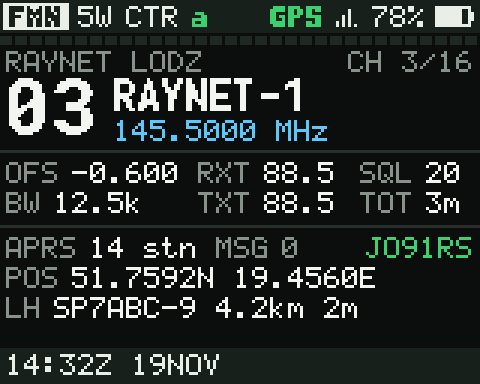
Ekran główny EMCOMEMCOM main screen

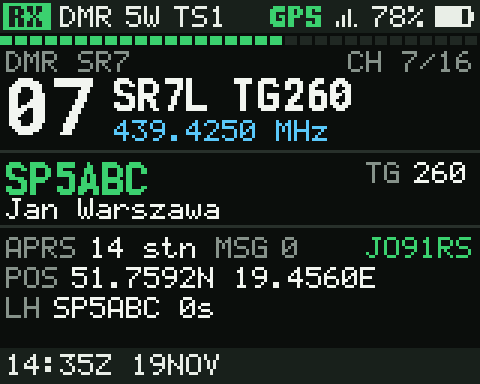
Pasek stanu z polem RX, TX, SCAN lub migającym SOS. Segmentowy S-metr, duży numer kanału z nazwą, panel z parametrami, poziomem odbioru w dBm, wywołującym DMR albo licznikiem nadawania. Niżej stacje APRS, nieprzeczytane wiadomości, lokator, pozycja i zegar UTC. W nocy cały ekran przechodzi na czerwień.

A status bar with an RX, TX, SCAN or flashing SOS field. Segmented S-meter, a big channel number with its name, a panel with the parameters, the RX level in dBm, the DMR caller or the TX timer. Below: APRS stations, unread messages, locator, position and UTC. At night the whole screen turns red.

Narzędzia terenoweField tools

Osobne kafelki w menu głównym, dostępne też pod szybkim klawiszem.

Separate main-menu tiles, also available as quickkeys.

Plan PACEPACE plan

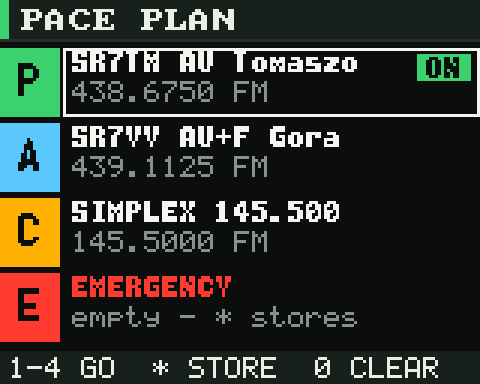
Cztery kanały planu łączności: podstawowy, alternatywny, awaryjny i ostateczny. Klawisz 1–4 przełącza radio od razu.

Four channels of the communication plan: primary, alternate, contingency and emergency. Keys 1–4 switch the radio at once.

PozycjaPosition

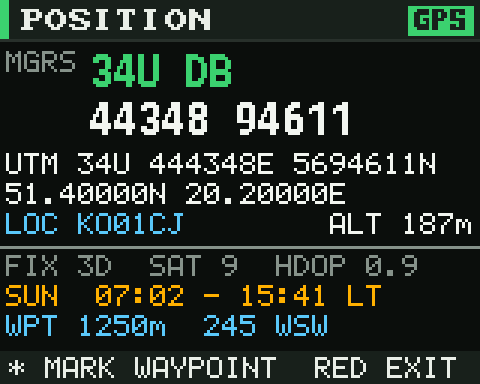
MGRS dużymi cyframi do podania przez radio, UTM, stopnie, lokator, wschód i zachód słońca, odległość i azymut do punktu.

MGRS in big digits to read over the air, UTM, degrees, locator, sunrise and sunset, distance and bearing to a waypoint.

Pomiar zasięguCoverage survey

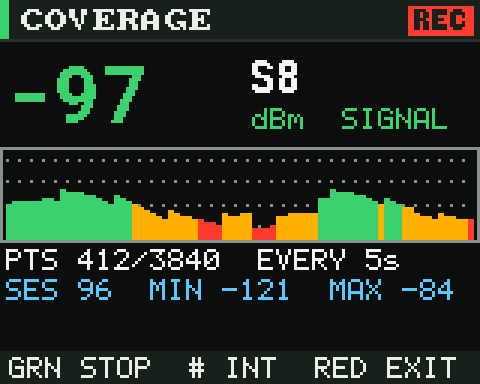
Poziom sygnału przemiennika z pozycją GPS co 1–30 s, do 3840 punktów. Na komputerze z tego powstaje kolorowa mapa KML.

The repeater signal level with the GPS position every 1–30 s, up to 3840 points. On the computer they become a colour-coded KML map.

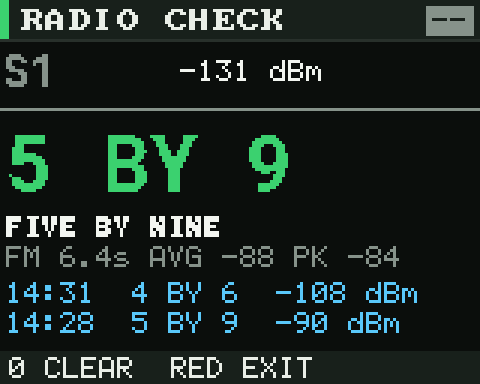
Radio check

Każda odebrana relacja jest mierzona i oceniana: „5 by 9”, gotowe do odczytania korespondentowi.

Every received over is measured and rated: “5 by 9”, ready to read back to the other station.

APRS, wiadomości i SOSAPRS, messages and SOS

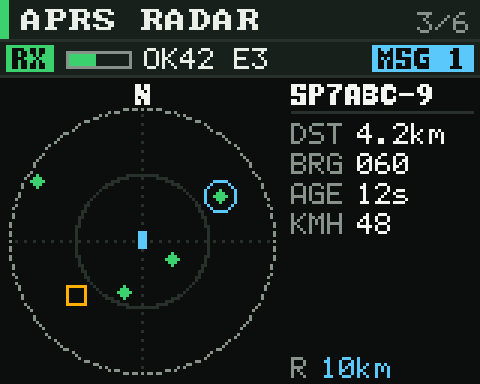
Radio samo dekoduje APRS z dźwięku FM: ramki, stacje z odległością i azymutem, radar, odbiór w tle. Wiadomości do Ciebie są potwierdzane automatycznie, możesz odpowiedzieć gotowym tekstem. SK1+9 dwa razy wysyła beacony z pozycją i symbolem alarmowym.

The radio decodes APRS from the FM audio by itself: frames, stations with distance and bearing, a radar, background RX. Messages to you are acknowledged automatically, and you can reply with a canned text. SK1+9 twice sends position beacons with the emergency symbol.

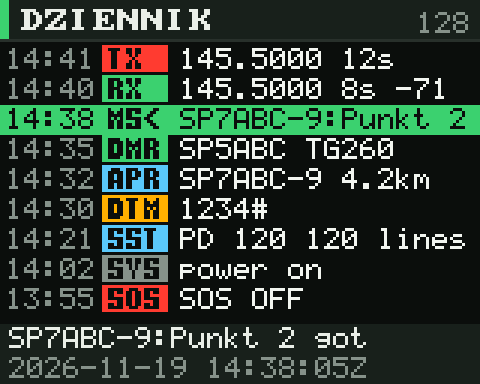
Dziennik zdarzeńEvent log

Każde nadawanie, odbiór FM, połączenie DMR, nowa stacja i wiadomość APRS, DTMF, SOS i obraz SSTV z czasem UTC. 2048 wpisów w pamięci flash, eksport do CSV po kablu.

Every transmission, FM reception, DMR call, new APRS station and message, DTMF, SOS and SSTV picture with its UTC time. 2048 entries in flash, exported to CSV over the cable.

Wgraj firmwareFlash the firmware

Bez instalowania programów: strona sama przygotowuje plik i zapisuje go w radiu przez USB. Działa w Chrome, Edge i Brave na komputerze.

Nothing to install: the page prepares the file and writes it to the radio over USB. Works in desktop Chrome, Edge and Brave.

  1. Przygotuj radioPrepare the radio

    • Zrób kopię codeplugu w CPS. Wgranie firmware jej nie kasuje, ale kopia nic nie kosztuje.
    • Back up the codeplug with the CPS. Flashing does not erase it, but a backup costs nothing.
    • Naładuj akumulator. Przerwane wgrywanie da się powtórzyć, ale lepiej tego uniknąć.
    • Charge the battery. An interrupted flash can be repeated, but better avoid it.
    • Wyłącz radio. Trzymając PTT i boczny przycisk nad nim, włącz je. Ekran zostaje pusty, dioda miga: radio jest w trybie aktualizacji. Podłącz kabel USB.
    • Switch the radio off. Holding PTT and the side button above it, switch it on. The screen stays blank and the LED blinks: the radio is in update mode. Plug in the USB cable.
  2. Wybierz wersjęChoose the version

    Kodek DMRDMR codec

    Co to jest plik dawcy?What is the donor file?

    Kodek głosu DMR (AMBE+2) jest objęty patentami i nie może być rozpowszechniany z OpenGD77. Strona wycina go z oryginalnego firmware TYT MD-9600 w wersji 26.45 (plik MD9600-CSV(2571V5)-V26.45.bin z paczki producenta) i wkleja do firmware, tak samo jak oficjalny program OpenGD77. Domyślnie strona używa kopii tego pliku z serwera (pobierz); możesz też wskazać własny, wtedy zostaje tylko w tej przeglądarce. Bez dawcy radio działa tylko na FM.

    The DMR voice codec (AMBE+2) is patented and cannot be distributed with OpenGD77. The page cuts it out of the original TYT MD-9600 firmware version 26.45 (the file MD9600-CSV(2571V5)-V26.45.bin from the manufacturer's package) and pastes it into the firmware, exactly like the official OpenGD77 loader. By default the page uses a copy of that file from this server (download); you can also choose your own, which then stays in this browser. Without a donor the radio works on FM only.

    Własne pliki (testowe wersje)Own files (test builds)

    Zamiast wersji z wydania wgraj plik .bin z własnej kompilacji i pasującą paczkę .gla.

    Instead of the release, flash a .bin from your own build and a matching .gla pack.

  3. WgrajFlash

Coś nie działaSomething does not work
Radia nie ma na liście urządzeń
The radio is not in the device list
Radio musi być w trybie aktualizacji (PTT + górny przycisk przy włączaniu), a nie normalnie włączone. Sprawdź kabel: niektóre kable programujące mają tylko zasilanie.
The radio has to be in update mode (PTT + top button while switching on), not switched on normally. Check the cable: some cables only carry power.
„Nie mogę przejąć radia”
“Cannot claim the radio”
Radio jest zajęte przez inny program albo inną kartę: zamknij CPS, kartę z webowym CPS OpenGD77 i skrypt wgrywania, potem spróbuj ponownie.
Another program or tab holds the radio: close the CPS, any tab with the OpenGD77 web CPS and the flashing script, then try again.
Windows
Przeglądarka potrzebuje sterownika WinUSB. Jeśli radio było wgrywane programem producenta, ma sterownik STM. Uruchom Zadig, wybierz „Digital Radio in USB mode” i zainstaluj WinUSB. Na macOS i Linuksie nic nie trzeba (na Linuksie może być potrzebna reguła udev dla 0483:df11).
The browser needs the WinUSB driver. If the radio was flashed with the manufacturer's tool, it uses the STM driver. Run Zadig, pick “Digital Radio in USB mode” and install WinUSB. Nothing is needed on macOS and Linux (Linux may need a udev rule for 0483:df11).
Wgrywanie przerwało się w połowie
Flashing stopped half way
Nic straconego: bootloader zostaje nienaruszony. Wyłącz radio, wejdź jeszcze raz w tryb aktualizacji i wgraj ponownie.
Nothing is lost: the bootloader is untouched. Switch the radio off, enter update mode again and flash again.
Na DMR nie ma dźwięku
No audio on DMR
Firmware został wgrany bez dawcy (opcja „Bez DMR”). Wybierz dawcę wbudowanego i wgraj jeszcze raz.
The firmware was flashed without a donor (the “No DMR” option). Choose the built-in donor and flash again.
Menu jest po angielsku
The menu is in English
Drugi język wybiera się w radiu: Opcje → Język. Paczka musi pochodzić z tego samego wydania co firmware, strona to sprawdza.
The second language is selected on the radio: Options → Language. The pack has to come from the same release as the firmware; the page checks that.

PlikiFiles

Do wgrania skryptem opengd77_stm32_firmware_loader.py z repozytorium albo do archiwum.

For flashing with the opengd77_stm32_firmware_loader.py script from the repository, or to keep.

python3 MDUV380_firmware/tools/opengd77_stm32_firmware_loader.py \
    -m MD-UV380 -f OpenGD77_MDUV380_RT3S.bin -L Polish.gla